
The Complete Guide to Parking Video Guidance Systems: Cameras That Guide, Count and Protect
How camera-based parking guidance finds open bays in real time, guides drivers with colour and LED displays, helps them find their car afterwards, and secures every space - all from one system.
In This Guide
- What a parking video guidance system is
- How parking video guidance works
- What the cameras show: colour indication
- The driver journey: entrance to exit
- Guidance cameras and coverage
- Guidance displays: outdoor and indoor
- Find My Car: the self-service kiosk
- ANPR and security: every bay under control
- Smart networking and reliability
- The management centre and analytics
- Video guidance vs sensor-based systems
- Where parking video guidance fits
- Choosing a parking guidance provider
- Parking guidance FAQs
Every driver knows the frustration: circling a full-looking parking level, brake lights everywhere, no way to tell which bays are actually free until you are right on top of them. Then, an hour later, the second search begins - where did I leave the car? In a large mall or hospital garage, that lost time adds up to congestion, emissions, and a poor first and last impression of the venue.
A parking video guidance system solves both problems with cameras. Small overhead units watch each bay, decide in real time whether it is free or taken, and light up in colour to point drivers straight to an open space. LED displays at the entrance and at every junction show how many bays remain and in which direction. And because the same cameras capture number plates and full video, drivers can later find their car in seconds - while operators gain security footage and live occupancy data for the whole site.
This guide explains - in plain language - what a parking video guidance system is, how it works, the hardware involved, and how South African malls, hospitals, airports and estates deploy it to move traffic faster and protect vehicles. It draws on nearly six decades of experience specifying and installing surveillance systems across all nine provinces.
Key Takeaways
- Overhead cameras detect free and occupied bays in real time - a single dual-lens camera covers up to 6 bays.
- Up to 7 configurable indicator colours and LED count displays guide drivers straight to the nearest open space.
- The same cameras read number plates (ANPR in under 150ms) and record HD video for security and evidence.
- A Find-My-Car kiosk locates any vehicle from a plate search, while one guidance terminal cuts cabling cost by up to 63%.
- Ideal for malls, hospitals, airports, estates and office towers - anywhere drivers waste time finding a bay or their car.
The System In Pictures
Want a parking guidance system designed for your site?
Our team designs camera-based guidance around your carpark layout, your bay count and your budget - starting with a free on-site assessment.
Request a Parking Guidance Quote Call 0861 002 2881. What a Parking Video Guidance System Is
A parking video guidance system - also called camera-based parking guidance or a smart parking guidance solution - uses overhead guidance cameras to detect whether each bay is occupied or free, and then guides drivers to the nearest open space. Instead of a simple sensor that only knows "occupied" or "empty", each camera also records video and reads number plates, so a single deployment delivers three things at once:
- Guidance - drivers are steered to free bays by coloured lights and LED count displays, cutting the time and fuel spent searching.
- Management - operators see live occupancy, usage patterns and alarms across every level from one platform.
- Security - continuous HD video and a full parking log protect against vehicle damage, theft and unauthorised access.
The core building blocks are the same on almost every site: guidance cameras over the bays, an indoor guidance screen and outdoor entrance sign, a guidance terminal that powers and connects the cameras, ANPR cameras and barriers at the entry and exit, and a self-service Find-My-Car kiosk for drivers on their way out.
2. How Parking Video Guidance Works
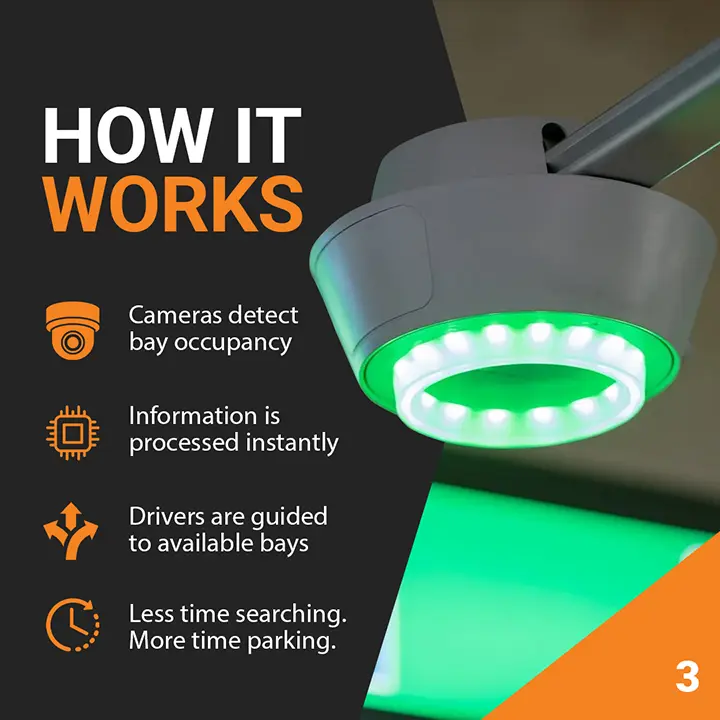
The intelligence sits in the guidance camera. Mounted on the ceiling above a run of bays, it uses video analytics to analyse each space and decide, frame by frame, whether that bay is free or taken. When the status changes, three things happen almost instantly:
- The bay indicator changes colour - the light built into the camera turns green for available or red for taken, visible from the far end of the aisle.
- The junction displays update - LED screens at each junction recalculate how many spaces remain in each direction and update the arrows and numbers.
- The platform records it - occupancy, the vehicle image and (where fitted) the number plate are logged centrally for reporting and Find-My-Car.
At the entrance and exit, dedicated ANPR cameras read each number plate and work with the barrier and access control to log every entry and exit. Guidance cameras and terminals are linked over standard network cabling, so the whole system behaves like one intelligent layer over your carpark rather than a box of disconnected gadgets.
The Question That Separates Good Guidance From Bad
Ask any provider two things: "How many bays does each camera actually cover on my layout?" and "Does the system keep guiding drivers if the central server goes offline?" The honest answer to the first depends on lens choice and ceiling height; the answer to the second should be a firm yes, thanks to edge storage at the guidance terminal.
3. What the Cameras Show: Let the Colour Do the Talking
The indicator light inside each guidance camera supports up to seven configurable colours, so a glance down an aisle tells a driver not just where a bay is free, but what kind of bay it is. The meaning of each colour is defined by the site operator - a typical scheme looks like this:
Beyond simple availability, the system can flag special statuses by colour too - a bay being used without a booking, an unlicensed vehicle, or a car parked over the line - so enforcement and management are built into the same lights that guide the public. If the camera cannot be mounted directly over the bays it serves, a cross-control indicator light can be placed where drivers will actually see it, keeping the guidance clear regardless of the ceiling layout.
4. The Driver Journey: From Entrance to Exit
A well-designed system guides a driver at every stage, from the street to the space and back again:
Drive-in
ANPR at the boom reads the plate and the barrier lifts, logging entry time automatically.
Entrance Sign
The outdoor display shows total spaces available before the driver even enters.
Guidance Screen
Indoor LED screens at junctions show counts and arrows toward free zones.
Bay Indication
Green camera lights point straight to open bays down each aisle.
Find My Car
On return, the kiosk maps the car and the shortest route from a plate search.
Drive-out
Payment and ANPR at the exit clear the vehicle and free the bay in the count.
The result is a carpark that feels effortless to use: less circling, less congestion at the ramps, and far fewer drivers wandering the levels looking for a lost vehicle.
5. Guidance Cameras and Coverage
There is a camera for every layout, and choosing the right one is what keeps the system affordable. Coverage depends mainly on the lens:
- 1.3 MP single-lens camera - detects and monitors one or two bays, ideal for tight or irregular corners.
- 3 MP single-lens camera - covers about three bays in a standard row.
- Dual-lens 3 MP camera - detects and monitors up to six bays from a single unit, the most cost-effective choice for long, regular aisles.
Fewer cameras for the same coverage means lower hardware, cabling and installation cost - which is exactly why a proper site design pays for itself. Mounting distance and height matter too: cameras are typically installed at a ceiling height of around 2.5 m, with the horizontal distance to the bays chosen to match the lens. Getting this geometry right is the difference between reliable detection and constant miscounts.
Why Camera Selection Is Not a Detail
Specify the wrong lens or mounting height and the system either misses bays or needs far more cameras than it should. The number of cameras is set at design time by your aisle length and ceiling height - not guessed on site - so insist on a proper layout drawing before you buy.
6. Guidance Displays: Outdoor and Indoor
Cameras find the spaces; displays sell them to the driver. Two kinds work together:
- Outdoor guidance display - mounted at the garage entrance, it shows the total number of available spaces (and by level, if configured) so drivers decide to enter before they commit to a ramp.
- Indoor guidance displays - installed at critical junctions inside the carpark, these LED screens show the number and direction of available bays, guiding drivers turn by turn toward the nearest open zone. Multi-colour and one-, two- or three-direction versions suit different junctions.
Because the displays draw from live camera data, a bay that fills up is reflected within seconds - so drivers are never sent down an aisle that has just filled.
7. Find My Car: The Self-Service Kiosk
The second half of the parking experience - finding the car again - is where big garages lose people. A Find-My-Car query kiosk, usually a 22-inch touchscreen near the lifts or exits, fixes it. A driver simply enters all or part of their number plate, and the kiosk:
- Locates the vehicle on a floor map of the carpark,
- Shows a photo of the car in its bay to confirm the match,
- and draws the shortest walking route from the kiosk to the vehicle.
No more wandering level after level. When it is idle, the same kiosk can display advertising or wayfinding, turning a service point into a revenue and information surface too.
Where Venues See the Fastest Return
Shorter search times mean higher throughput at peak, fewer ramp jams, and a noticeably better shopper or patient experience - while Find-My-Car cuts the "lost car" calls that tie up security staff. One camera network, multiple returns.
8. ANPR and Security: Every Bay Under Control
Because guidance cameras are real cameras, the same hardware that counts bays also protects them. High-definition, real-time video is available for every bay, so incidents such as vehicle scraping, break-ins or theft are captured as evidence rather than reconstructed from patchy coverage. A robust parking log stores vehicle data, images and alarm information, giving operators a searchable record of who parked where and when.
Number plate recognition (ANPR / LPR) runs at two levels: at the bay via the guidance camera, and at the barriers via dedicated ANPR cameras. Hardware-based ANPR recognises plates from more than 83 countries in under 150 milliseconds, with the algorithm built into the server rather than bolted on in software, so entries, exits and parked vehicles are all tied to a verified plate. For a deeper look at the technology, see our companion piece on how LPR / ANPR works.
9. Smart Networking and Reliability
What makes a large deployment practical - and affordable - is the guidance terminal. This wall-mounted unit provides power, network access and edge storage for up to 32 nearby cameras, so cameras connect to a local terminal rather than each running back to a central room. In practice that means:
- Fewer switches and less cabling - a well-planned terminal layout can cut cabling cost by around 63%.
- Local video and image storage - up to 24 TB at the edge, close to the cameras that generate it.
- Offline operation - if the link to the central management software drops, video and data are stored locally and forwarded automatically once it returns.
Reliability is designed in. Guidance keeps running even when the central system is offline, thanks to a distributed backup of the parking database at the terminal, and the health of every device is monitored in real time so faults raise an automatic alert before drivers notice a problem.
The Edge + Central Difference
Central management gives you one view of the whole site; edge terminals make sure a network hiccup never stops the lights from guiding cars. Neither alone is as dependable as the two working together - which is why serious systems put storage and logic at the edge.
10. The Management Centre and Analytics
Above the cameras and terminals sits the parking management platform, part of a wider suite of intelligent video security solutions. From one console, operators can:
- Monitor and configure every device across all levels, with remote intercom, barrier control and manual plate correction.
- Manage vehicles accurately - with alarms for unauthorised parking, over-time parking, illegal access and other abnormal statuses.
- Report on usage - statistics on parking status history, bay usage rate and vehicle flow, so decisions about staffing, pricing and layout are driven by data.
Crucially, the platform is open. Through XML, SDK, API and CGI protocols it integrates with a VMS, access control, and third-party payment and app services - so parking guidance, security, entry management and billing all work as one system rather than four that happen to share a carpark. For sites that want alarms verified around the clock, the parking footage can also feed our 24/7 offsite monitoring control room.
11. Video Guidance vs Sensor-Based Systems
Older "smart parking" installs put an ultrasonic sensor above every bay. It works, but it only ever answers one question. Video guidance answers many - from the same device.
| Factor | Sensor-based guidance | Video guidance |
|---|---|---|
| Coverage per device | ✗ One sensor per bay | ✓ Up to 6 bays per camera |
| What it captures | ✗ Occupied / free only | ✓ Occupancy + plate + image + video |
| Security value | ✗ None | ✓ HD surveillance & evidence |
| Find my car | ✗ Not possible | ✓ Plate search + route on a map |
| Cabling & switches | ✗ Dense wiring to every bay | ✓ Up to 63% less cabling |
| Extra insight | ✗ Counts only | ✓ Usage stats, overstay & illegal-parking alarms |
12. Where Parking Video Guidance Fits
The system earns its keep anywhere drivers waste time finding a bay or finding their car afterwards. We design and install parking video guidance for:
- Shopping centres & malls - fast turnover at peak, Find-My-Car for shoppers, and security across multi-level garages.
- Hospitals & healthcare - reducing stress for visitors and keeping emergency and staff bays properly managed.
- Airports & transport hubs - very large garages where wayfinding and vehicle recovery matter most.
- Mixed-use & commercial estates - visitor and tenant parking with ANPR at the booms and clear guidance inside.
- Office towers & corporate campuses - staff and visitor bays, reserved and VIP allocation by colour, and usage reporting.
- Hotels, stadiums & venues - moving large volumes of vehicles in and out quickly around events, with valet and guest parking.
Internationally, systems of this type run in some of the largest retail garages in the world - from a 2,500-bay shopping centre in Spain to a 1,600-bay staff garage in Germany - proof the approach scales from a single deck to a multi-building campus.
13. Choosing a Parking Guidance Provider
Not every installer that offers "smart parking" delivers a system that works day after day. Before you sign, run through this checklist - a serious provider will satisfy every item without hesitation.
- PSIRA registered, with a number you can verify on psira.co.za
- SAIDSA accredited - the recognised installer standard insurers expect
- Provides a proper camera layout drawing showing bays-per-camera for your site
- Sizes lenses and mounting heights to your ceiling and aisle geometry
- Confirms guidance keeps running if the central server goes offline
- Includes outdoor and indoor displays sized to your junctions and entrance
- Offers a Find-My-Car kiosk and ANPR at the entry and exit barriers
- Integrates with your VMS, access control and payment via open protocols
- Designs in power backup so guidance survives load shedding
- Backs the system with a formal SLA and proactive maintenance
Ready to make your carpark guide itself?
Book a free parking guidance site assessment. We'll map your bays, size the cameras and displays, and show you exactly where guidance will move traffic faster - with no obligation.
Request a Free Site Assessment Speak to a Parking Specialist14. Parking Guidance FAQs
Browse answers by category. These cover how parking video guidance works, what it can detect and show, deployment and reliability, and how it is managed and integrated.
Parking Video Guidance Frequently Asked Questions - South Africa
Answers about how camera-based parking guidance works, what it detects and shows, deployment and reliability, and how it is managed and integrated for commercial sites in South Africa.
Parking Guidance Questions
Select a category below to browse answers for malls, hospitals, airports and estates across South Africa
Choose a category above to view answers.
The Bottom Line
A parking video guidance system is not just a fancier way to count empty bays - it changes what a carpark does. Done well, it guides drivers straight to a space, helps them find their car again in seconds, keeps every vehicle under surveillance, and hands operators live data and alarms for the whole site. Done badly - wrong lenses, no edge storage, displays that lag reality - it becomes signage that drivers learn to distrust.
The difference comes down to the company behind the system: whether they draw a proper camera layout for your site, size the hardware to your building, design for offline reliability and load shedding, and integrate guidance with security, access and payment. Choose a partner who treats parking guidance as an engineered system, not a box of lights.
About CCTV Security Surveillance
Founded in 1967, CCTV Security Surveillance is one of South Africa's most experienced commercial and industrial surveillance specialists. PSIRA registered and SAIDSA accredited, we have deployed 50,000+ cameras for 7,000+ clients across all 9 provinces, backed by an in-house 24/7 control room. Every parking guidance system we design starts with a professional site audit and camera layout, built around your carpark, your bay count and your operational needs.
Request a Free Site Audit Contact Us