
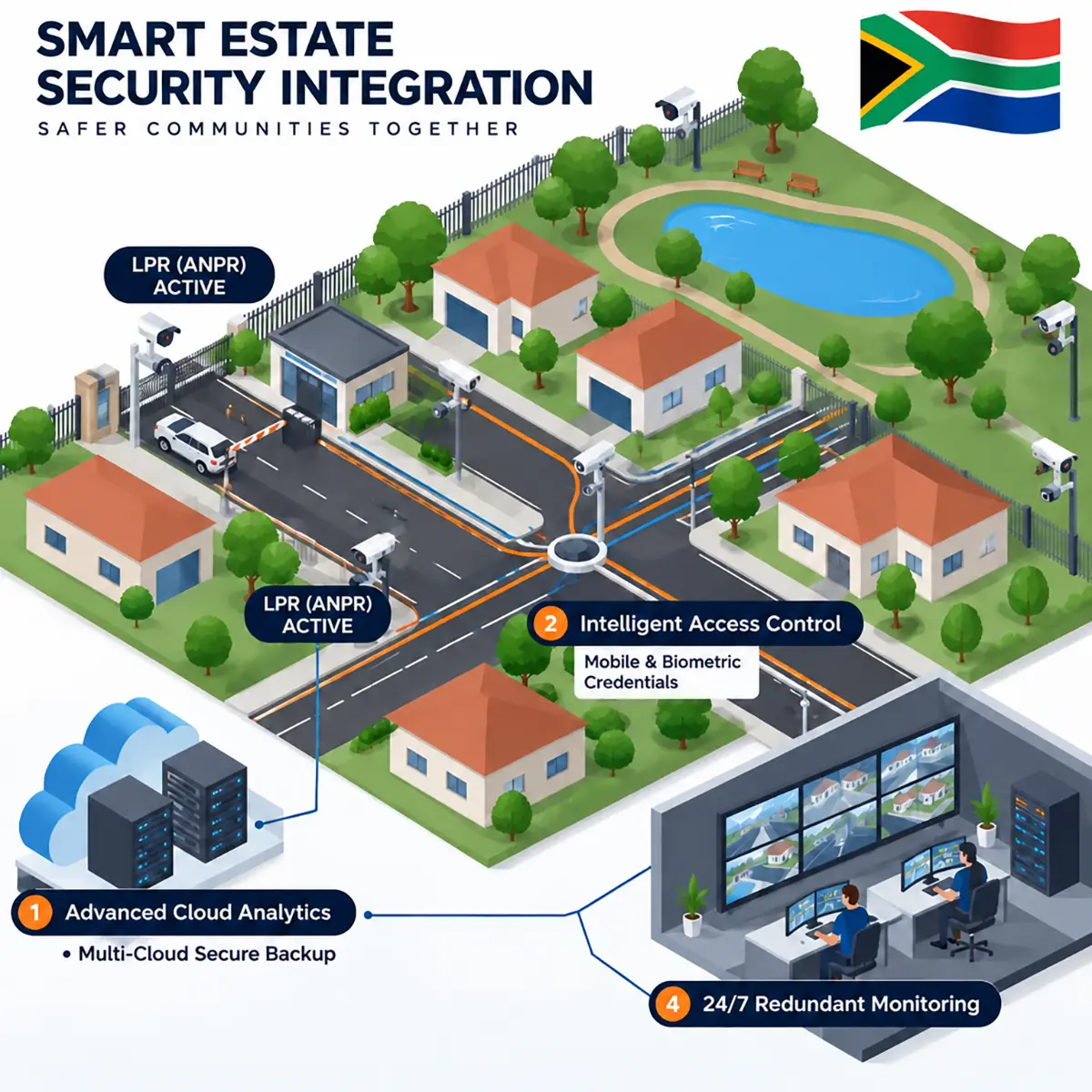
CCTV for estates works best as one integrated security system, not a collection of cameras. A typical South African security estate needs AI or thermal detection on the perimeter linked to the electric fence, licence plate recognition (LPR) and overview cameras at every vehicle gate, and recognition-level cameras on pedestrian gates, internal roads and amenities. All of it should feed a control room or 24/7 offsite monitoring service that acts on alerts while an incident is still happening.
This guide is for HOA directors, body corporate trustees, estate managers and managing agents planning a new system or replacing an old one. It covers what each zone needs, how cameras work with fences, gates, guards and armed response, resilience, POPIA at the gate, and how to approve and budget for estate and community security.
Key Takeaways
- Design by zone and task. Each zone needs a different camera and pixel density.
- Integrate, then monitor. Fence alarms, LPR, access control and analytics should raise alerts that a person verifies and acts on, 24/7.
- Build in resilience. Backup power, a separate camera network and protected fibre or wireless links.
- Collect less at the gate. The Information Regulator's draft code proposes short CCTV retention and warns against copying IDs or taking biometrics as a condition of entry.
- Plan the money properly. Get the right approval, compare quotes like-for-like and phase the rollout if needed.
Estate CCTV In Pictures
Planning CCTV for your estate?
We design estate security zone by zone, starting with a free on-site assessment and a written proposal your trustees can evaluate.
Request a Free Site Assessment Call 0861 002 2881. What CCTV Does a Security Estate Need?
A security estate needs CCTV that does four jobs: detect anyone approaching or crossing the perimeter, identify every vehicle and person entering through the gates, observe movement inside the estate, and put every alert in front of someone who can respond. The fence, gate equipment, guards, control room and armed response must work as one system.
Estates are not immune to crime because they have a wall and a boom. According to SAPS figures reported by BusinessTech in June 2026, South Africa recorded 32,387 residential burglaries between January and March 2026, 8.7% fewer than a year earlier. The same report named tailgating at access-controlled entrances as a common way in. Estate systems must also deal with perimeter breaches at night, shared or cloned access credentials, contractor and staff risk, theft from common areas, and disputes where footage is the only objective record.
CCTV at the gate is already standard practice. A 2019 study of security estates in Pretoria East by the African Policing Civilian Oversight Forum found that 80% of the estates studied had 24/7 recording CCTV at their entry gates, often linked to LPR. The difference now lies in how well cameras are designed, integrated and monitored.
2. Start With a Zone Plan and an Operational Requirement
Before specifying cameras, divide the estate into zones and write down what each camera must achieve. SAIDSA By-Law 9 calls for this operational requirement per camera, including who monitors it and how events are handled. For each zone, ask:
- What could go wrong here? Intrusion, tailgating, theft, vandalism, a safety incident or a dispute.
- What must the camera show? That someone is present, what they are doing, or exactly who or which vehicle it is.
- What happens next? Record for evidence, alert the guardhouse, or trigger a verified response from a control room.
The answers drive the camera type, position, lighting, analytics and monitoring, and give trustees a written specification to compare quotes against.
Perimeter
Detect approaches and crossings day and night, and verify fence alarms on video.
Vehicle Gates
Read every plate, record every vehicle and flag tailgating at the boom.
Pedestrian Gates
Record staff, contractors and visitors on foot at a clear, usable angle.
Internal Roads
Observe vehicle and foot movement across the estate after the gate.
Clubhouse & Amenities
Cover entrances, parking and shared facilities without filming private spaces.
Service & Refuse Areas
Watch the back-of-house gates and yards that criminals and contractors use.
Guardhouse & Control Room
Turn alerts into action, and protect the recorders that hold the evidence.
3. Estate CCTV Design by Zone
The table below summarises a typical design. Layouts vary, but these zones apply to most estates and larger complexes.
| Zone | Typical camera and integration | What it needs to achieve |
|---|---|---|
| Perimeter wall and fence | Thermal or AI cameras linked to fence zones, with PTZ for tracking | Detect crossings day and night and verify every fence alarm |
| Main, visitor and contractor gates | One LPR camera per lane plus an overview camera and tailgating detection | Read every plate, record the vehicle and flag tailgating |
| Pedestrian gates and turnstiles | Fixed cameras at head height, linked to access control | Record each person well enough to identify them later |
| Internal roads | Bullet or multi-sensor cameras at junctions and choke points | Observe and track movement through the estate |
| Clubhouse and amenities | Vandal-resistant domes on entrances, parking and open areas | Recognise people, with no cameras in change rooms or toilets |
| Service and refuse areas | Bullet cameras with after-hours analytics | Detect after-hours activity |
| Guardhouse and control room | Video wall, alarm management software and a camera on the room | Verify and escalate alerts, and protect recorders |
4. Perimeter: Thermal, AI and Electric Fence Integration
The perimeter is where an intrusion should be detected, before anyone reaches a home. SA practice is often summarised as detect, verify, identify, track and deter. AI cameras with line-crossing analytics classify people and vehicles and ignore most movement from animals, rain and vegetation. On long or poorly lit fence lines, thermal cameras detect body heat in complete darkness and mist, and one can cover a stretch that would need several standard cameras. Thermal detects but does not identify, so pair it with PTZ or standard cameras. See our page on thermal security and offsite monitoring.
Most estates already have an electric fence, and the biggest gain is usually linking it to the cameras. When a fence zone alarms, the system should call up the camera or PTZ preset for that zone, so an operator sees within seconds whether it is an intruder, a branch or a fault. This alarm verification cuts false call-outs and the alarm fatigue that leads guards to ignore genuine alarms. Our guide to electric fencing and CCTV integration explains how the two work together.
Keep Your Electric Fence Certificates Current
Under the Electrical Machinery Regulations, an electric fence installed, extended or materially altered since 1 October 2012 needs an Electric Fence Certificate issued by a registered electric fence system installer. Energisers should comply with SANS 60335-2-76, and installations follow SANS 10222-3. An energiser replacement or fence extension can require a new certificate, so keep one on file per zone and ask your installer what applies (ECASA summary).
5. Vehicle Gates: LPR, Overview Cameras and Tailgating Detection
LPR (licence plate recognition, also called ANPR or number plate recognition) is a camera and software system that reads vehicle registration numbers automatically and logs them with the time and lane. At an estate gate it records every entry and exit, can open the boom for listed vehicles and alerts the guardhouse to vehicles of concern. Read more about LPR and ANPR cameras and how licence plate recognition works.
Good gate design uses one dedicated LPR camera per lane, entry and exit, at the angle the manufacturer specifies, plus an overview camera that records the whole vehicle and its occupants. Main, visitor and contractor gates all need this, because criminals choose the least-watched entrance.
Tailgating, where a second vehicle follows an authorised one through a single boom cycle, is a common way in. Boom loop detectors and analytics can count vehicles per opening and raise an immediate alert, while LPR captures both plates. Linking the gate to access control and intercom systems matches every credential and visitor code to video (see integrating access control with CCTV).
Gate Design That Respects POPIA
A defensible gate in 2026 combines LPR, an overview camera, clear signage and a host-issued visitor code or pre-authorisation, without routinely copying IDs or licences. We do not recommend facial recognition or ID scanning for visitors as a default. If your estate is considering either, do a written proportionality assessment first (see section 11).
6. Pedestrian Gates, Internal Roads, Amenities and Service Areas
Pedestrian gates
Staff, contractors and visitors on foot need a fixed camera at head height, set to identification density and linked to access control events, so an incident can be investigated later. This is recording for evidence, not face recognition, and your gate signage should cover it.
Internal roads and common areas
Cameras at intersections and choke points let the control room follow a suspicious vehicle or person across the estate. Observation density is usually enough, with recognition at key junctions. Aim them at roads and common property, not residents' stands.
Clubhouse, gym, pool and play areas
Cover entrances, parking and open common spaces with vandal-resistant domes. SAIDSA By-Law 9 rules out cameras in bathrooms, change rooms and bedrooms, and audio needs separate authorisation.
Service, refuse and maintenance areas
Refuse areas, maintenance yards and service gates are often the weakest point: out of sight, used by outside vehicles and quiet at night. After-hours analytics can alert the control room to any activity outside agreed times.
7. What Is DORI? Choosing the Right Pixel Density
DORI (detect, observe, recognise, identify) is a way of specifying cameras by the task they must perform, measured in pixels per metre on the target, rather than by megapixels. The international standard IEC 62676-4 sets four levels:
- Detect (25 px/m): a person or vehicle is present. Perimeters.
- Observe (62.5 px/m, usually rounded to 62): clothing, posture and actions. Internal roads and common areas.
- Recognise (125 px/m): whether a person is someone you know. Amenities and key junctions.
- Identify (250 px/m): a stranger beyond reasonable doubt. Vehicle and pedestrian gates.
A 2025 revision adds a more detailed seven-step scale, but DORI remains the common language. A high-megapixel camera covering a wide area may only reach "detect" at its far edge, while a lower-resolution camera aimed at one lane can reach "identify". Ask every bidder to state the DORI level each camera achieves.
8. AI Analytics, Offsite Monitoring, Guards and the Control Room
A large estate has more cameras than any guard can watch. AI video analytics watch every camera and raise an alert only for specific events, such as a person at the perimeter after dark or tailgating at the boom. Offsite monitoring is a service in which trained operators in a remote control room verify those alerts on live video and escalate them to guards, armed response or SAPS while the incident is happening.
Monitoring changes what guards do rather than replacing them. Guards still process visitors, patrol and respond first on site, with armed response as back-up. 24/7 offsite monitoring adds an independent set of eyes that is not tired or under pressure at the gate, and a record of every alert.
| Factor | Guards with recording-only CCTV | Guards + AI CCTV + offsite monitoring |
|---|---|---|
| Perimeter at night | ✗ Depends on patrol timing and alertness | ✓ Every camera watched by analytics, alerts verified by operators |
| Fence alarms | ✗ Guard sent to check, often a false alarm | ✓ Verified on video in seconds before anyone is dispatched |
| Tailgating and gate abuse | ✗ Found later, if at all | ✓ Flagged at the boom as it happens |
| Response | ✗ Relies on one team on site | ✓ Coordinated escalation to guards, armed response and SAPS |
The guardhouse and control room
The guardhouse needs gates and alarmed zones on screen first, simple playback, and software that pops up the right camera when an alarm triggers. Keep recorders in a locked cabinet with its own camera, because a stolen recorder takes the evidence with it. Installing and monitoring security equipment are regulated services, so check that your installer and monitoring provider are registered with PSIRA.
9. Network, Backhaul and Backup Power
Estate cameras are often hundreds of metres from the guardhouse, so network and power design matter as much as the cameras.
- Fibre backbone: the most reliable way to carry video over distance, and immune to electrical interference. SAIDSA By-Law 9 says to plan the fibre loss budget for at least three repairs.
- Wireless links: point-to-point radio links reach perimeter poles and remote gates where trenching is impractical. They need line of sight and their own backup power.
- Copper and cable theft: exposed copper attracts thieves. Protect cable routes and use fibre or wireless for long runs.
- A separate camera network: keep CCTV, access control and gates on their own network or VLAN, away from residents' Wi-Fi, with changed default passwords and current firmware. Read more about network security in electronic surveillance.
- Backup power: cameras, recorders, switches, wireless links and boom gates need UPS, battery or inverter backup, and remote poles can run on solar. See our inverter and solar solutions.
10. Recording, Retention and Evidence for SAPS
Size storage for the retention period your estate can justify (see section 11), use redundant drives, and consider cloud recording and storage for key cameras so a copy survives a stolen recorder. A simple evidence procedure:
- Keep every clock correct. Synchronise cameras and recorders to a network time source so timestamps match across cameras, LPR logs and access control events.
- Export only what is relevant, in the recorder's original format with its player, and keep a copy with the incident report.
- Log the handover: who exported the footage, when, to whom, and for which SAPS case number.
- Release through an authorised person, such as the information officer or estate manager, against a written request from the investigating officer, never as a phone clip shared on a WhatsApp group.
11. POPIA at the Gate: The Draft Gated Access Code
Under the Protection of Personal Information Act (POPIA), the body corporate or HOA is the responsible party for its CCTV, LPR and visitor data, and its security, CCTV, monitoring and visitor-app providers are operators. POPIA allows administrative fines of up to R10 million.
In October 2024, Information Regulator chair Adv Pansy Tlakula said a driver's name, vehicle registration and car colour should be sufficient at an estate gate, criticising the routine scanning of driver's licences. At the end of April 2026, the Regulator published a draft Code of Conduct on the processing of personal information at gated accesses for public comment, with comments closing on 14 May 2026. Once approved, the draft says, it will bind body corporates, trustees, HOAs and estate managers.
This Is a Draft: Check Its Status
The points below come from the draft published for comment and may change. Check the Information Regulator's website for the current position, and take legal advice where needed. POPIA itself applies today.
What the draft code proposes
- Collect the minimum. Visitors: name, purpose, vehicle registration (if driving) and times in and out. Contractors: name, company, work order reference and times. ID copies, photos, home addresses and full ID numbers are listed as excessive.
- Consent must be real. Consent is not voluntary if entry depends on an ID number or biometrics, and signing a register is not implied consent. Biometrics are special personal information.
- Prefer less invasive options, such as a host-issued access code or an ID that is shown but not copied.
- Give a section 18 notice at the gate saying who collects the information and why, whether it is voluntary, who can access it, and how to complain to the Regulator.
- Sign operator agreements with the security company and other operators, covering security measures and breach notification.
- Explain automated decisions. An LPR boom that opens only for listed vehicles, or AI flagging "suspicious behaviour", must be understandable and open to challenge. Links to SAPS LPR must be disclosed.
- Appoint an information officer, such as the HOA chair or managing agent, with the estate manager as deputy.
Proposed retention ranges in the draft code
| Record | Proposed retention (draft) |
|---|---|
| CCTV footage | 7 to 30 days, overwritten automatically; export and keep only footage linked to an incident |
| Visitor registers | 30 to 90 days, up to 6 months if the risk justifies it |
| Access control logs | 30 to 90 days, 6 to 12 months for high-risk sites |
| Contractor records | 6 to 12 months after the contract ends |
| Incident and occurrence reports | 3 to 5 years |
In practice: size CCTV storage for the top of that range rather than the 60 to 90 days some estates have been sold, export incident footage cleanly, and adopt a written retention schedule.
12. Residents' Privacy: Where Estate Cameras Must Not Look
Estate cameras exist to cover the perimeter, gates and common property, not residents' homes. According to a commentary on a 2025 Western Cape High Court ruling, cameras with sightlines into a neighbour's pool, patio and bedroom infringed privacy despite their security purpose. Residents accept less privacy on common roads, but keep full privacy in their homes and exclusive-use areas.
- Use privacy masking on any camera whose view includes windows, private gardens, pools or patios, and record the masking in the commissioning documents.
- Limit PTZ cameras so they cannot be panned or zoomed into stands.
- Adopt a written CCTV policy covering purpose, locations, who may view footage, retention, owner requests and signage, as recommended by sectional title commentators.
- Set a rule for residents' own cameras, approving them based on what they can actually see.
Common Estate CCTV Mistakes
Buying by camera count; one LPR camera for two lanes; fence alarms nobody can verify on video; cameras on residents' Wi-Fi; no backup power for links and gates; cameras that look into homes; months of footage nobody can justify; and no maintenance contract.
13. Maintenance and Service Level Agreements
Estate cameras run outdoors around the clock. Without planned maintenance, lenses get dirty, vegetation grows into views, batteries fade and drives fail, and trustees find out only when footage is missing. A good agreement includes:
- Health monitoring that flags offline cameras, recording failures and drive errors, with regular uptime reports to the estate manager.
- Preventive visits to clean lenses, check views against the design, test batteries and check LPR read rates.
- Defined response and repair times, with the gates, perimeter and recorders given the highest priority.
- Firmware and password management, plus a record of every change made to the system.
- Clear ownership of licences, passwords and configuration, so the estate is not locked in if it changes provider.
Learn about our maintenance and rental agreements, which can also spread the cost of a system over time.
14. How Should Trustees Approve and Budget for Estate CCTV?
Most estate projects stall in the boardroom, not on site. A clear process helps trustees make a decision they can defend to owners.
- Assess and specify. Start with a site survey and a written, zone-by-zone specification.
- Get the right approval. In sectional title schemes, trustees can often approve a camera system as a reasonably necessary improvement to common property under the prescribed management rules, but some projects need an owners' resolution. HOAs act under their memorandum of incorporation and rules. CSOS handles community scheme disputes.
- Choose the funding. Monitoring, maintenance and connectivity usually sit in the levy-funded operating budget. Capital work may come from the reserve fund, a special levy, a phased plan or a rental agreement.
- Compare quotes like-for-like against the same specification, using the table below.
| Compare this | Why it matters |
|---|---|
| DORI level per camera | Same camera count, very different evidence |
| Analytics and licences | AI, LPR or alarm software may be missing or charged annually |
| Storage and redundancy | Must match your retention policy and survive a failed recorder |
| Network and power | Where cheap quotes usually cut corners |
| Monitoring and maintenance | Monthly costs and SLA response times decide the real long-term cost |
A typical phased rollout
- Phase 1: gate LPR and overview cameras, tailgating detection, pedestrian gates, backup power and a secure recorder.
- Phase 2: thermal or AI perimeter detection linked to the electric fence, plus 24/7 offsite monitoring.
- Phase 3: internal roads, amenities, service areas and cloud backup.
Cost depends on perimeter length, gates and lanes, camera types, analytics, backhaul, storage, power, monitoring and maintenance, so there is no fixed estate package. As a general indication for business systems, our CCTV for business pricing guide gives bands of R100,000 to R300,000 for 25 to 75 cameras and R300,000 to R1 million for 75 to 200 cameras, with installation and cabling making up 25% to 35% of the total. A site assessment turns that into an itemised quote for your estate.
15. Estate CCTV in Johannesburg and Gauteng
Gauteng has a high concentration of security estates and complexes, from Johannesburg's northern suburbs to Pretoria East and Centurion, many in areas covered by private community LPR networks. If your estate shares gate data with such a network or SAPS, the draft code expects that purpose to be disclosed.
In 2025 the City of Johannesburg introduced a by-law requiring registration of private CCTV cameras that view public places, including ANPR, which was challenged by civil society and property groups. If your cameras view a public road, check its current status with your provider or legal adviser. For local support, see our CCTV Johannesburg, CCTV Pretoria and Gauteng pages.
16. Choosing an Estate Security Provider: A Checklist
A serious provider will satisfy every item. Our article on due diligence when choosing an electronic security partner goes into more detail.
- PSIRA registered, with a number you can verify on psira.co.za
- SAIDSA accredited, the recognised installer standard insurers expect
- Starts with an on-site survey and states the DORI level for each camera
- Designs one LPR camera per lane, plus overview cameras and tailgating detection
- Integrates the electric fence, access control and intercom with the cameras
- Offers AI analytics and 24/7 offsite monitoring from its own control room
- Designs the network, fibre or wireless backhaul and backup power, not just the cameras
- Configures retention and privacy masking for POPIA, and signs an operator agreement
- Provides a maintenance agreement with defined response times and uptime reporting
- Hands over documentation, licences and passwords that belong to the estate
Where Estates Usually See the Fastest Improvement
Gate LPR with tailgating detection, video-verified fence alarms and after-hours perimeter monitoring usually make the biggest early difference: fewer false call-outs and incidents stopped at the boundary.
Ready to plan your estate's security properly?
Book a free estate CCTV site assessment. We'll map your zones, specify the right camera for each one and give your trustees a clear, phased proposal, with no obligation.
Request a Free Site Assessment Speak to an Estate Security SpecialistThe Bottom Line
Good CCTV for estates is not about the number of cameras. It is about the right camera in each zone for a clear task, integrated with the fence, gates and access control, and connected to people who act. For trustees, the job is to set the specification, keep the system lawful as the gated access code develops, respect residents' privacy, and fund maintenance properly. Explore our estate and community security solutions and CCTV systems, or speak to our team about your estate.